> For the complete documentation index, see [llms.txt](https://docs.sia.tech/llms.txt). Markdown versions of documentation pages are available by appending `.md` to page URLs; this page is available as [Markdown](https://docs.sia.tech/provide-storage/transferring-siacoins.md).
# Transferring Siacoins
Whether you're sending Siacoins to an exchange or receiving from a friend, `hostd` can transfer Siacoins (SC). You can also check the transaction status via the UI.
## Sending Siacoins
Go to `hostd`. If you're asked to unlock the UI, use your custom password if you've set one. If you haven't got a wallet set up in `hostd`, visit our [Setting up `hostd`](/provide-storage/setting-up-hostd.md) guide; otherwise, choose from the sidebar **Wallet**.
### Setup your transaction
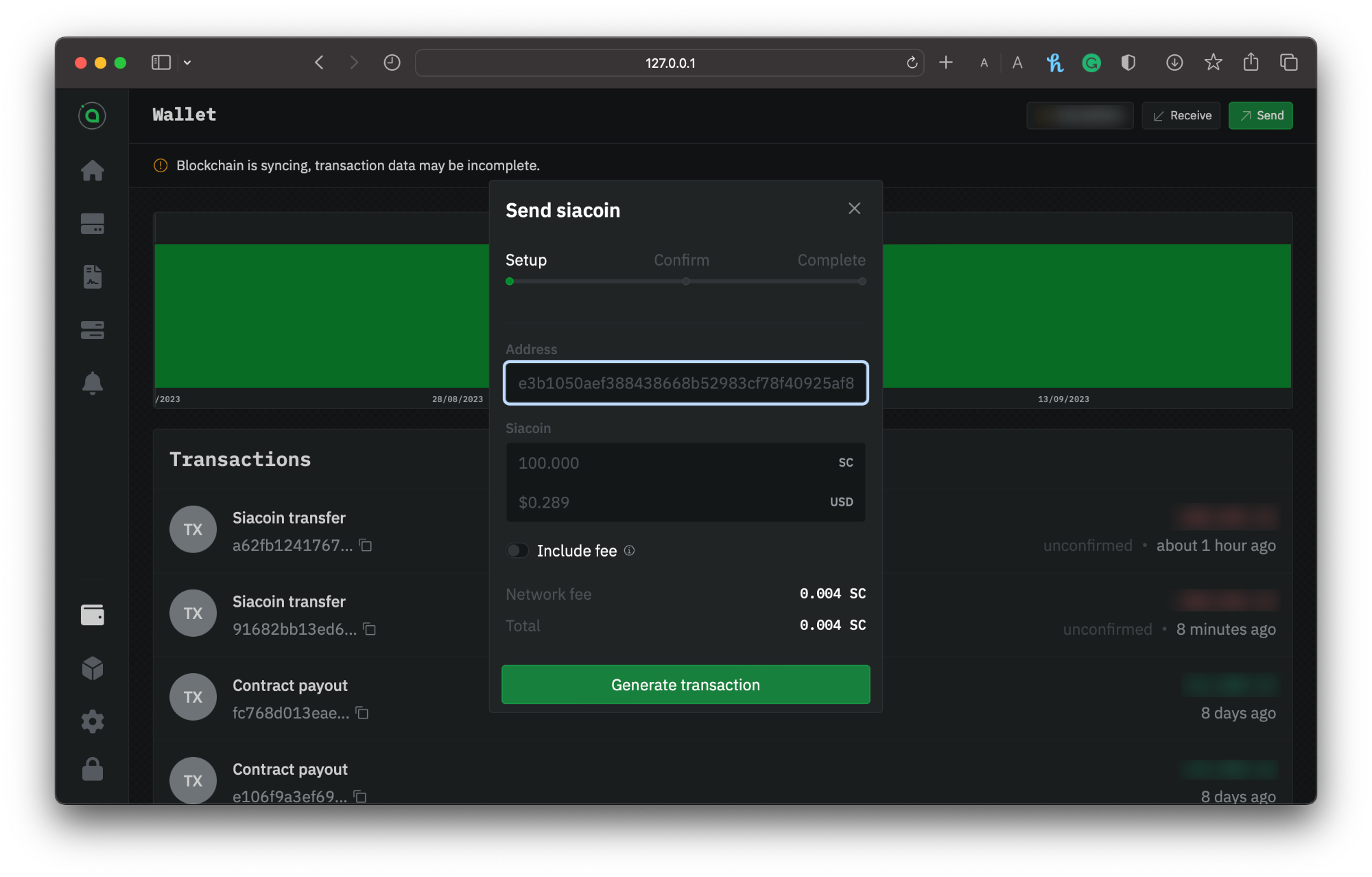
Click on the `Send` button. Enter the recipient's wallet address and the amount of Siacoins you want to send. Make sure that you've entered a Siacoin wallet address and that you've entered it correctly.
Sending Siacoins via hostd
{% hint style="warning" %}
Siacoins sent to mistyped addresses or addresses of other types of cryptocurrency can not be retrieved.
{% endhint %}
Click **Generate Transaction.**
### Confirm your info
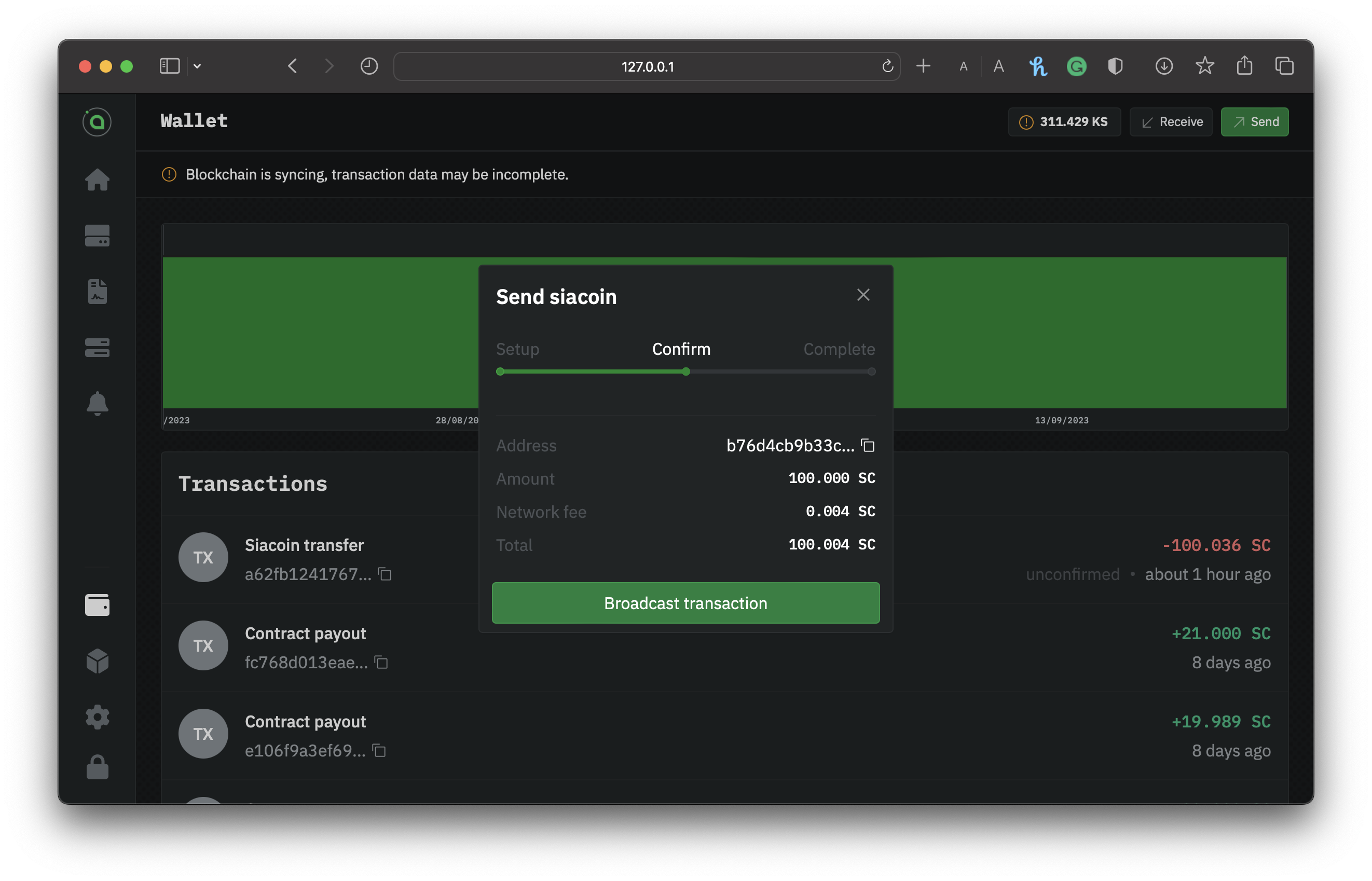
Next, you need to confirm everything. You'll have a chance to double-check the currency, amount, and recipient address. The window will also show you estimated network fees.
Confirming your transaction
Click **Setup** to change something. If it's all good, click **Broadcast transaction**.
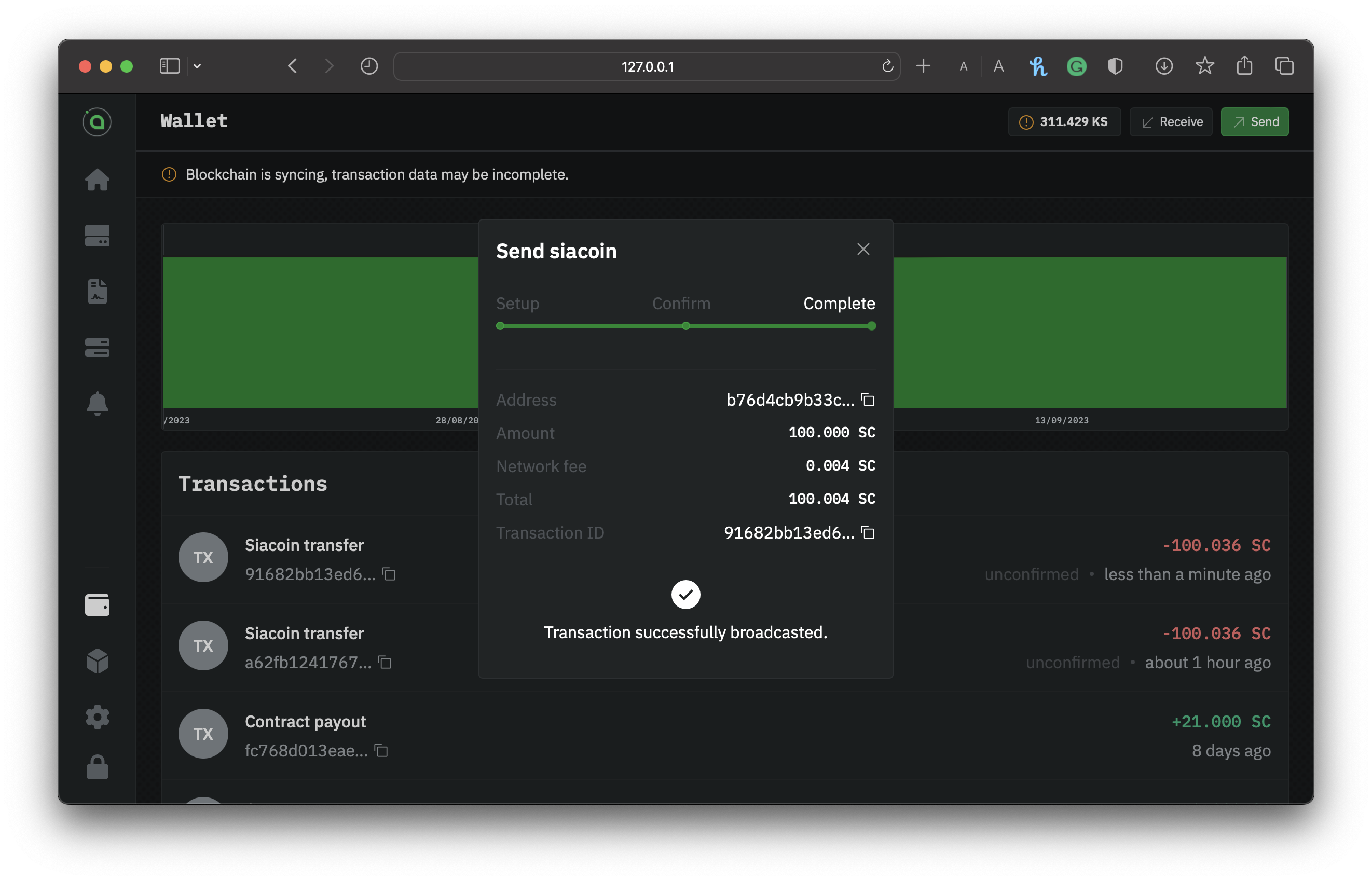
Confirmation of a successful transaction broadcasted
You'll get a confirmation that your transaction has been broadcast.
### Checking the status
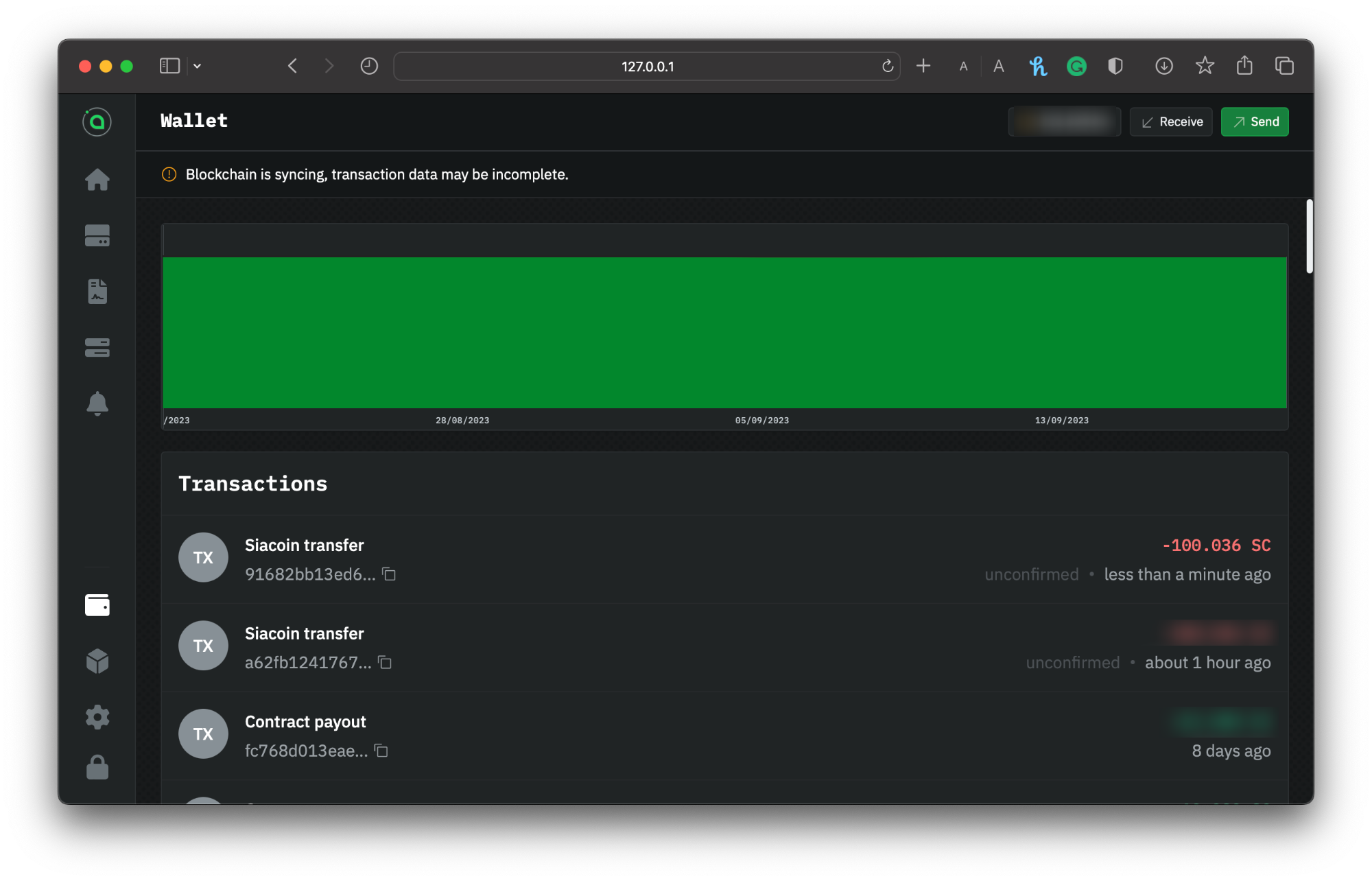
By looking at the transactions in the **Wallet** section of the UI. It's normal to 'Unconfirmed' at the latest transaction, which means the transaction is on its way but hasn't yet appeared in a block.
hostd wallet transaction list
{% hint style="info" %}
It might take a minute or two to appear in the wallet's transactions list.
{% endhint %}
Once it's in a block, you can check the status and see a new transaction type of **siacoin transfer**.
## Receiving Siacoins
Before you can start providing storage, you must have Siacoins (SC) in your `hostd` wallet for the following:
* Locking Siacoin as collateral to ensure they are financially incentivized to store data.
* You are submitting storage proofs to the blockchain. If your wallet runs out of Siacoin, your host node cannot submit storage proofs, and you will lose collateral.
{% hint style="info" %}
We recommend around **$50 worth of Siacoin** to start providing storage. Storage providers are constantly locking collateral; you may need more or less depending on how much data you store, you may need more or less.
{% endhint %}
{% hint style="warning" %}
You can still transfer funds to your wallet, but please note that they won't be accessible until the wallet is completely synced.
{% endhint %}
Go to `hostd`. If you're asked to unlock the UI, use your custom password if you've set one. If you haven't got a wallet set up in `hostd`, visit our [Setting up `hostd`](/provide-storage/setting-up-hostd.md) and choose from the sidebar **Wallet**.
### Sharing the address or QR
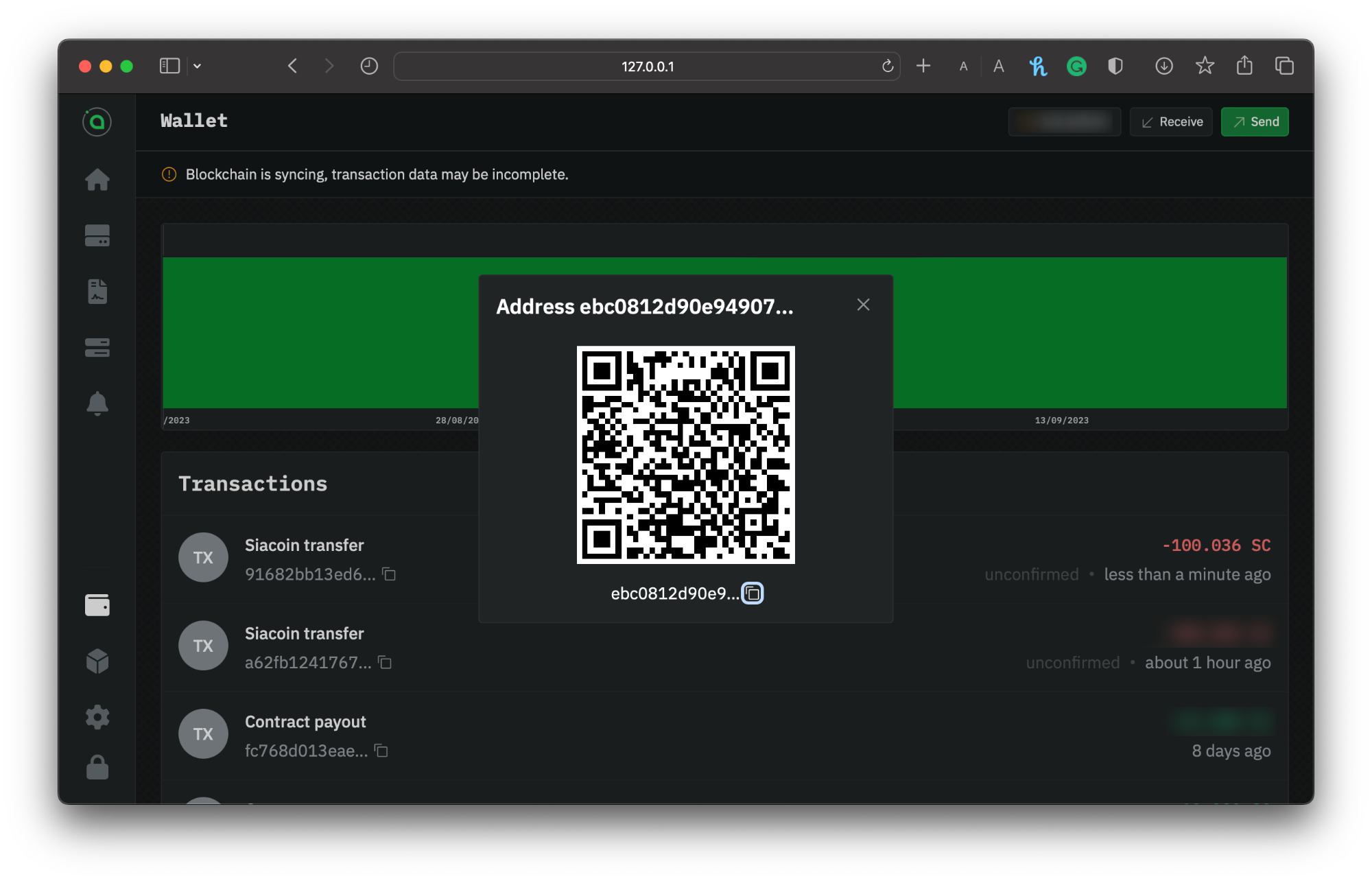
Copy and paste your address manually, or use the **Copy** button to the right to ensure you get the full address without any extra spaces, and provide this address to whomever you're receiving the funds from.
You can also receive Siacoins by sharing your QR code for others to scan.
Getting the address and QR of your hostd wallet
The transaction can check the transaction status by going to your **Dashboard** and selecting the wallet you made the transaction with. It's normal to see **Unknown** at the top of the list of transactions; it means the transaction is on its way but hasn't yet appeared in a block.
{% hint style="info" %}
The transaction might take a minute or two to appear in the wallet's transactions list.
{% endhint %}
Once it's in a block, you can check the status and see a new transaction type of **siacoin transfer**.
---
# Agent Instructions
This documentation is published with GitBook. GitBook is the documentation platform designed so that both humans and AI agents can read, navigate, and reason over technical content effectively. Learn more at gitbook.com.
## Querying This Documentation
If you need additional information that is not directly available in this page, you can query the documentation by asking a question.
Perform an HTTP GET request on the following URL with the `ask` and `goal` query parameters:
```
GET https://docs.sia.tech/provide-storage/transferring-siacoins.md?ask=&goal=
```
`ask` is the immediate question: it should be specific, self-contained, and written in natural language.
`goal` is what the user is ultimately trying to achieve, the reason they need the answer. Sharing it helps GitBook give you a better, more relevant answer. A goal is most helpful when it describes the outcome the user wants rather than restating the question. For example, with `ask=how do I create an API token`, a goal like `automate deployments from our CI pipeline` lets GitBook tailor the answer to that use case.
The response will contain a direct answer to the question and relevant excerpts and sources from the documentation.
Use this mechanism when the answer is not explicitly present in the current page, you need clarification or additional context, or you want to retrieve related documentation sections.